OS Memory Management
This post is a comprehensive summary of memory management in Operating Systems with a focus on virtual memory and paging.
Memory Hierarchy
Section titled “Memory Hierarchy”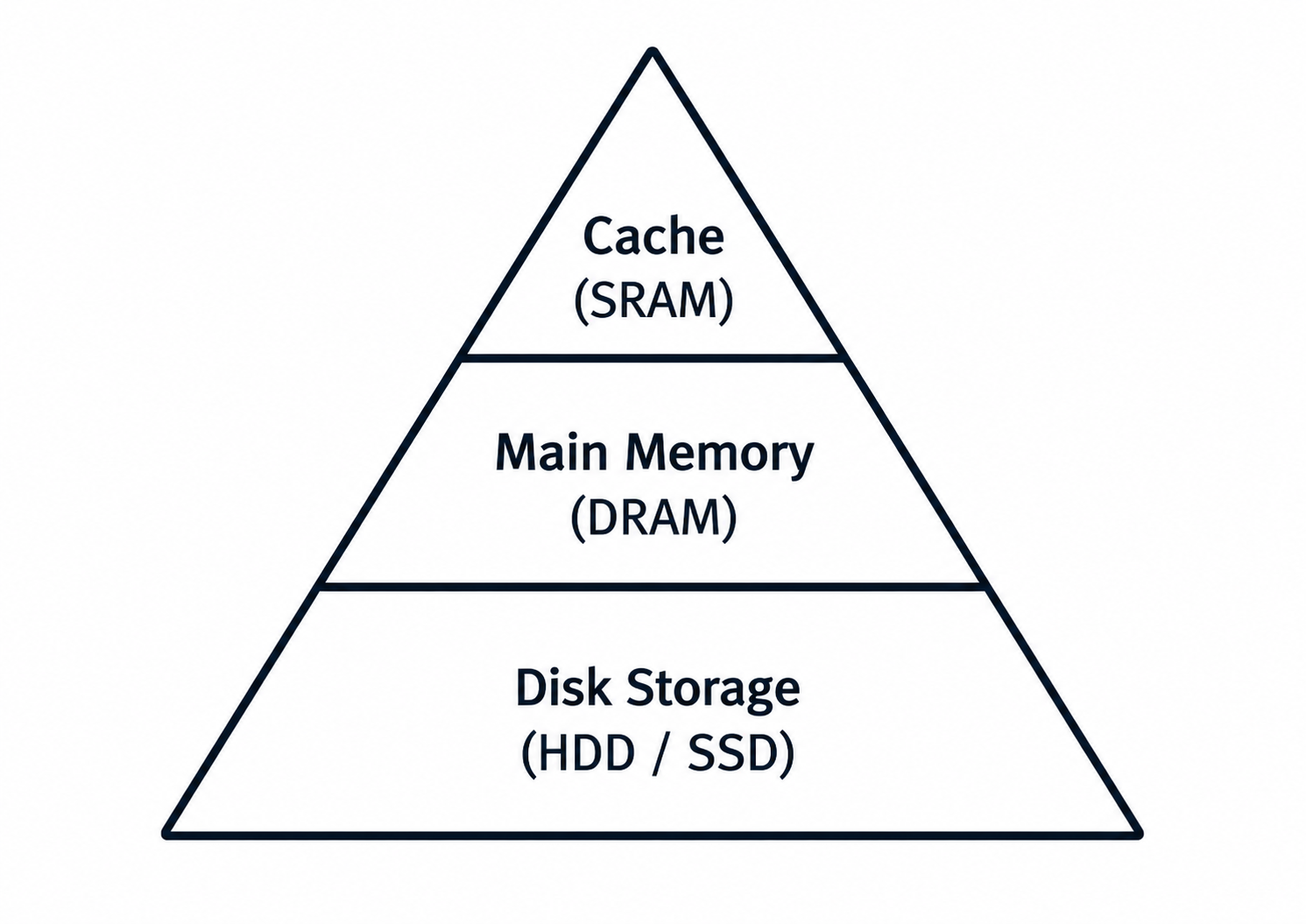
Memory hierarchy is probably a topic that deserves its own post, but let’s review the basics. The traditional memory hierarchy model consists of three layers: cache, main memory, and disk storage. Reading data from disk is orders of magnitude slower than reading from main memory, and reading from main memory is much slower than reading from cache. Conversely, the faster the storage is, the smaller and more expensive it tends to be.
If the data we are trying to read is not in cache, the hardware can fetch it from main memory, usually along with its neighbors in the same cache line. This does not require OS intervention. Modern CPUs usually have multiple levels of cache. Lower-level caches (L1 and L2) are typically private to each core, while higher-level caches (L3) are often shared across cores. Main memory is shared by all cores.
If the data we are trying to access is not currently available in main memory, the CPU raises a page fault. The process may be temporarily suspended while the OS resolves the page fault and makes data available in main memory.
In terms of hardware, caches are usually built with SRAM, while main memory is built with DRAM. SRAM (static RAM) is faster, but it is also more expensive and takes more physical space. As long as power is supplied, bits in SRAM persist without refreshing.
DRAM (dynamic RAM) is cheaper and denser, meaning it can store more data per unit of space. DRAM stores each bit as a tiny electrical charge that slowly leaks away, so the data has to be periodically refreshed (rewritten).
Unlike SRAM and DRAM, disks are non-volatile, which means data is not lost even when power is turned off. Traditional hard disk drives (HDD) store data on spinning magnetic platters. A read/write head sits at the end of a mechanical arm like the needle on a record player. As the platter spins, the arm moves the head to the right position so it can read or write data from the magnetic surface. Solid-state drives (SSD) have mostly replaced HDDs in modern PCs because they are faster with no moving mechanical parts.
Virtual Memory
Section titled “Virtual Memory”When multiple processes share the same RAM, the physical memory layout can quickly become messy. Data from different processes may be scattered throughout memory, and it would be a nightmare if the programmer (or even the compiler) had to keep track of where every piece of data currently lives in physical memory.
Fortunately, memory can be virtualized. Programmers can write code as if each process has its own private and contiguous address space, while the hardware and OS translate virtual addresses to the right physical addresses when memory is actually accessed.
The virtual address space is byte-addressable, meaning each byte has a unique memory address. When we say a machine is 32-bit or 64-bit, we are talking about how many bits are used to represent a memory address, and therefore the size of the address space. For example, a 32-bit address can represent up to 2^32 different byte addresses. It does not mean that memory itself is divided into 32-bit or 64-bit chunks. From the programmer’s perspective, memory is really just one contiguous sequence of bytes.
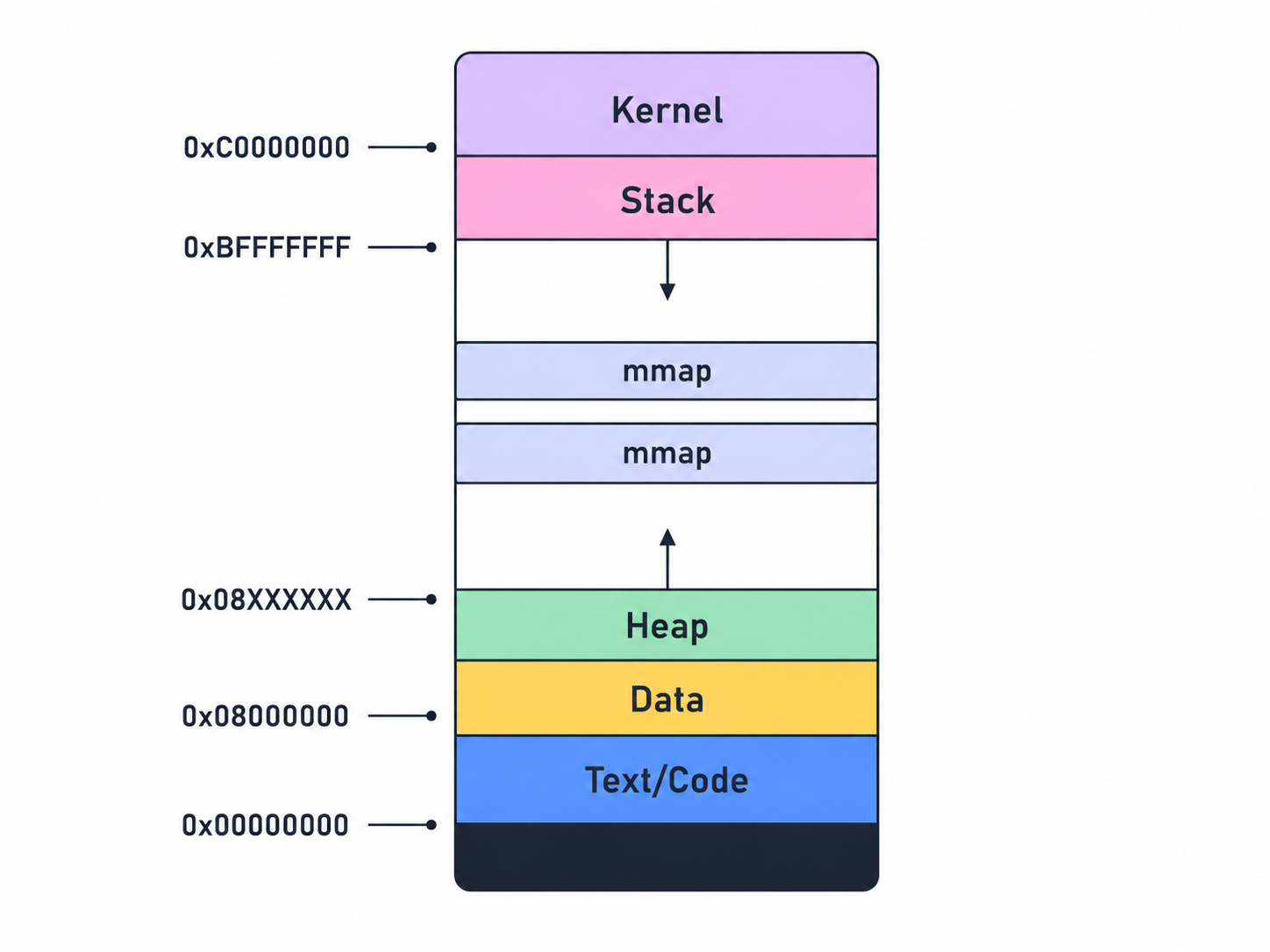
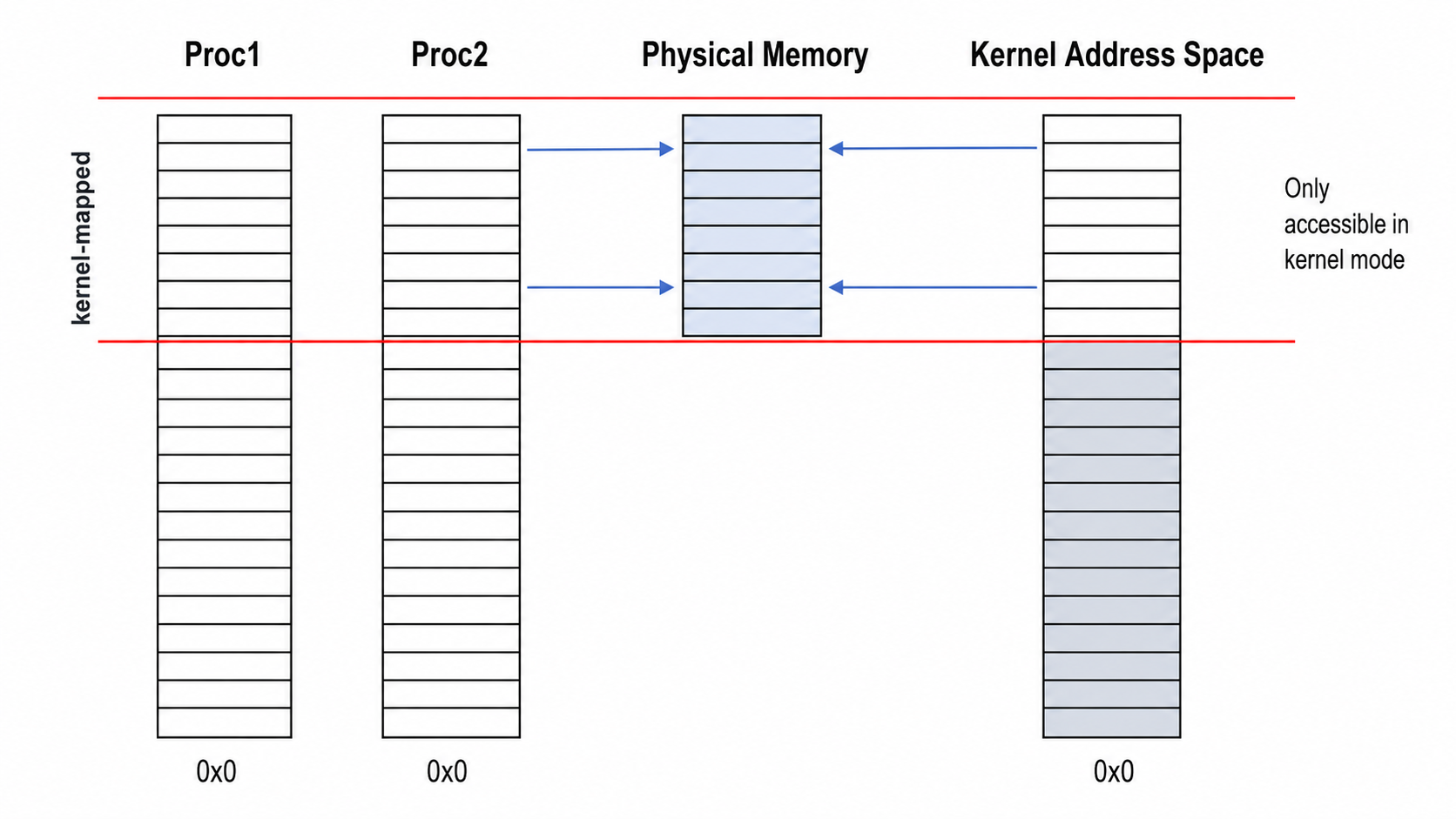
Virtual memory is laid out in a vey specific way. In many systems, the high virtual address range is reserved for the kernel. When the computer boots, the kernel is loaded into physical RAM and kept resident so that it is not swapped out like normal user pages. This kernel range is mapped into each process’s virtual address space at the same location and is accessible in privileged mode. When a system call, interrupt, or exception switches the CPU into kernel mode, execution can jump into this kernel-mapped range.
Below the kernel range, we have argc and argv for the command-line arguments passed to main. argc stores the number of arguments and argv stores their values.
Next, we have the stack and heap. The stack starts at a high address and grows downward, while the heap grows in the opposite direction. So the stack and heap grow toward each other.
The stack grows and shrinks as the program executes. Each time a function is called, a stack frame is allocated, and local variables are stored inside that stack frame. When the function returns, the memory used by that stack frame is no longer valid and may be overwritten by later function calls.
The heap is used for dynamically allocated memory. Heap memory can outlive the function call that allocated it, which is useful when we want data to be preserved across function calls. In C, we can use malloc and free to allocate and release memory from the heap, and many data structure libraries dynamically allocate memory under the hood.
Below the heap, there are segments for global and static variables (data and bss), and a segment for program code (text). The data segment stores initialized global and static variables, while the bss segment stores uninitialized or zero-initialized global and static variables. The text segment stores the actual program instructions and is usually marked read-only.
Page Table and the MMU
Section titled “Page Table and the MMU”Now, we know what virtual memory is, and we also know that the OS somehow makes sure the needed data is available in physical RAM, and translates virtual addresses to the right physical addresses. Let’s see how this works.
First of all, virtual memory is divided into pages, and physical memory is divided into frames. Pages and frames are the same size, e.g., 4 KB. A page maps to a frame. Since memory is managed at page granularity, all addresses within the same page are brought into memory and evicted together as one unit.
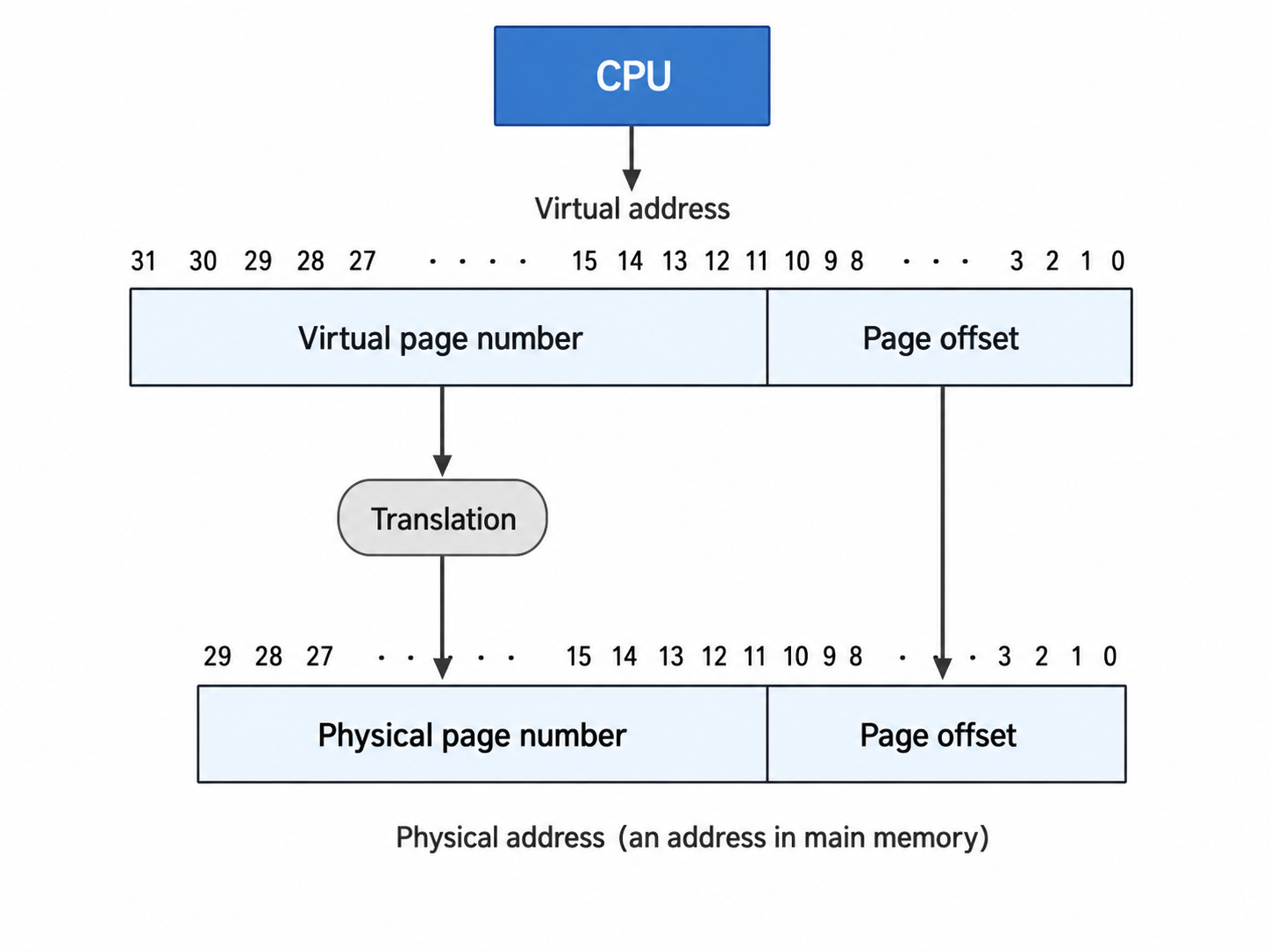
Since the virtual address space is much larger than physical memory, not all pages can be mapped to frames at the same time. We need information about whether a page is currently mapped to a frame, and if so, which frame it maps to. The question is (1) where this mapping is stored and (2) who manages it.
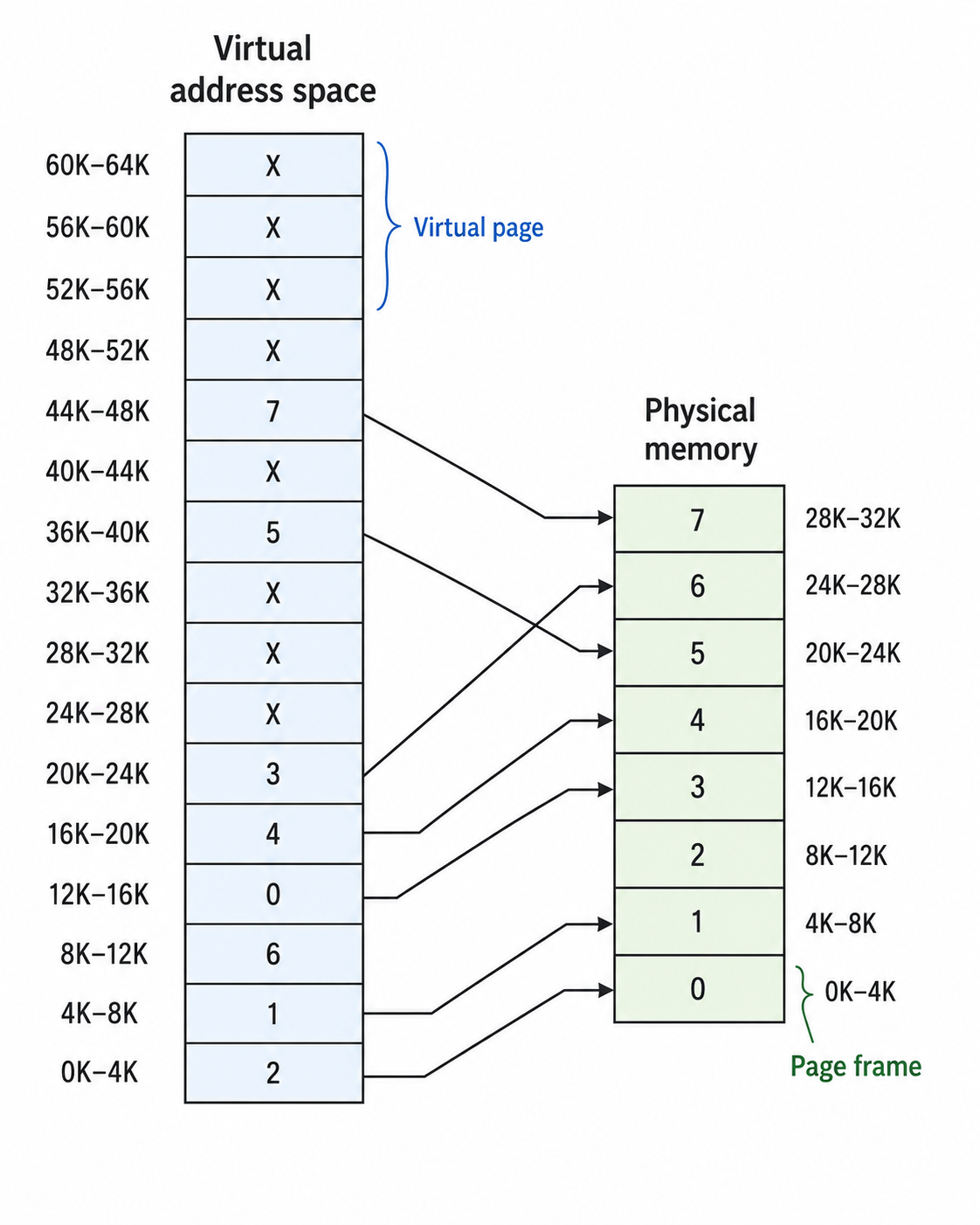
The mapping is stored in a table called the page table, and the page table lives in physical memory. Each process has its own page table, so physical RAM contains the page tables for the processes that currently exist in the system.
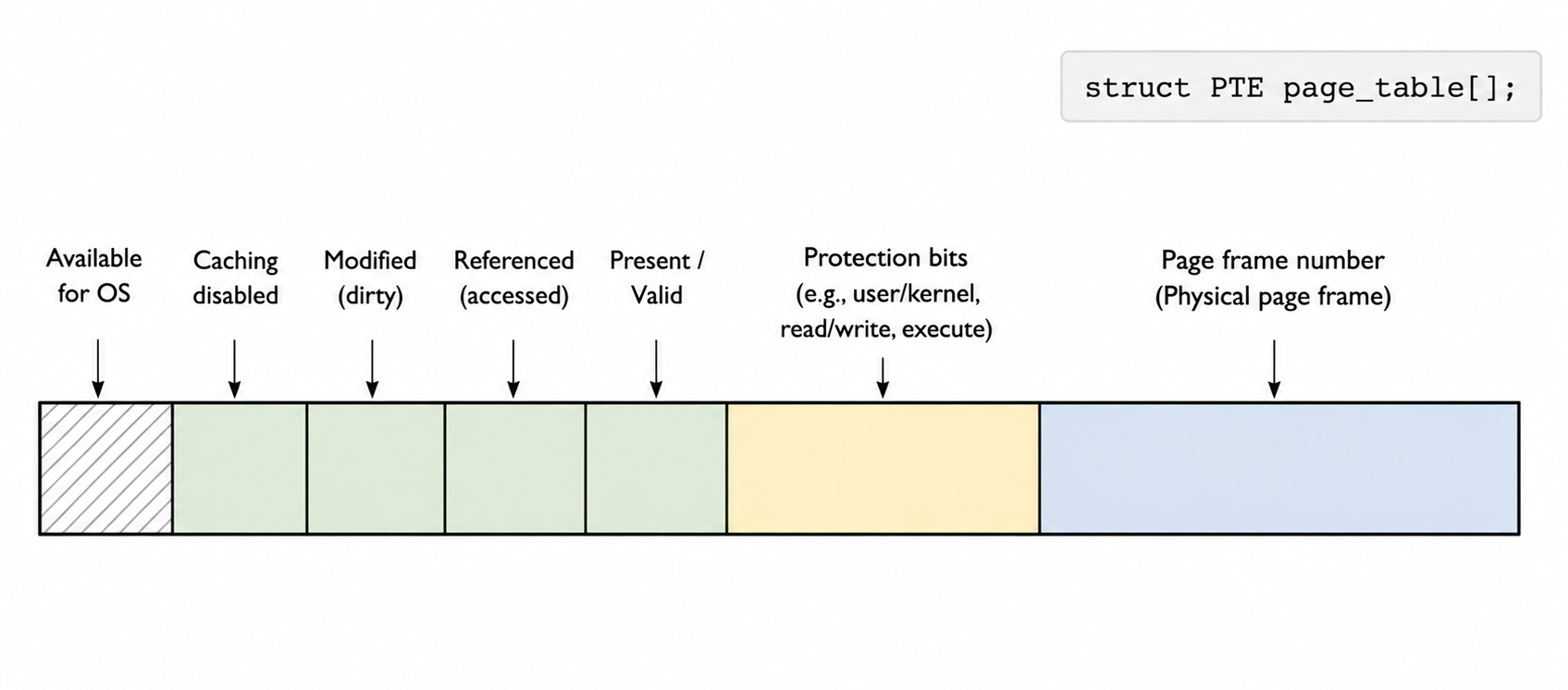
A page table entry stores information about a virtual page.
- Present/valid bit: Marks whether this virtual page currently has a valid translation. If the bit is not set and the process accesses the page, we get a page fault exception.
- Frame number: Stores the physical frame number that this virtual page maps to (if the page is present).
- Protection bits: Specify who can access the page and what operations are allowed. A page may be kernel-only, read-only, writable, etc. If a process violates these permissions, the hardware raises an exception.
- Reference bit: Set when the page is accessed, either by a load or store. The OS can use this to estimate which pages have been used recently, which helps with page eviction.
- Modified/dirty bit: Set when the page is written to. This tells the OS that the page has changed since it was loaded, so if the page is evicted, it may need to be written back to disk.
- Caching disabled bit: Marks that accesses to this page should not be cached. This is useful for memory-mapped I/O device registers, where caching could cause the CPU to read stale values instead of the device’s current state.
So who reads the page table and actually translates virtual pages to physical frames? This is done by a hardware unit called the MMU (Memory Management Unit).
The MMU translates virtual addresses to physical addresses whenever the CPU needs to access memory. For example, when the CPU needs to fetch an instruction, the MMU translates the instruction’s virtual address to a physical address so that the CPU can fetch the actual instruction from physical memory. Similarly, for load and store instructions, the MMU translates virtual addresses to physical addresses so that the CPU can read from or write to physical memory. If the MMU reads the page table and discovers that the page table entry is not valid, it raises a page fault which is then handled by the OS.
Multi-level Page Table and the TLB
Section titled “Multi-level Page Table and the TLB”Now, let’s take a look at two ways we can make virtual address to physical address translation more efficient.
The first is multi-level paging. The virtual address space is huge, and it is not always fully populated. If the size of the page table is proportional to the number of virtual pages, the page table can also become huge and sparse. Note that the page table is not a hash table that supports flexible lookups. It is a contiguous array of entries stored in physical memory, and lookup relies on direct indexing using the virtual page number. So in a naive, single-level page table, we cannot simply keep entries only for the pages that are currently active, because the virtual page number needs to map directly to a fixed location in the table.
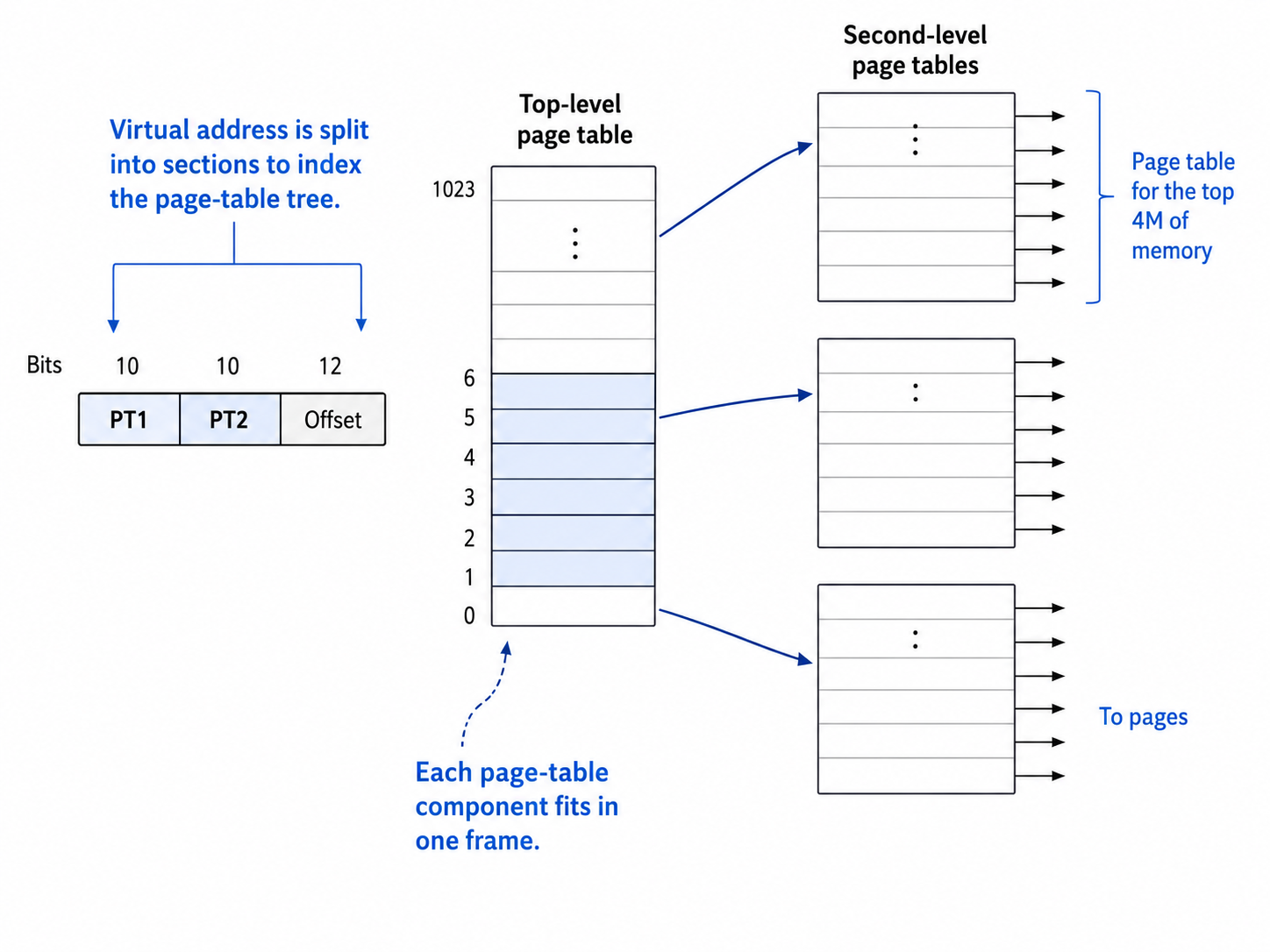
Multi-level page tables address this waste of space. In a two-level design, the virtual address is split into [level 1 index][level 2 index][offset]. Instead of having one giant page table with an entry for every virtual page, pages are grouped together. The first-level table has an entry for each group, which points to a second-level table. The second-level table then contains the entries for the individual pages in that group.
The key idea is that we start with only the first-level table, and allocate a second-level table only when pages from that group are actually used. This way, the OS does not need to allocate page table space for large regions of virtual address space that are never touched.
The second optimization is the Translation Lookaside Buffer (TLB). Most programs tend to make a large number of references to a small number of pages over a period of time. The TLB is a hardware cache inside the MMU that stores recent virtual address to physical address translations. Before reading the page table in RAM, the MMU first checks whether the virtual page number is in the TLB. If there is a hit, the TLB returns the matching physical frame number, and the MMU can complete the translation without reading the page table. If there is a miss, only then does the MMU read the page table in RAM.
The OS also has to make sure that TLB entries do not become stale. When a page is evicted or unmapped, the corresponding entry in the TLB must be invalidated so that the MMU does not keep using an old translation.
Also note that the MMU performs translation for the currently active process. When a context switch happens, the OS updates the MMU to use the next process’s page table and flushes or invalidates stale TLB entries so that translations from the previous process are not accidentally reused.
Frame Table
Section titled “Frame Table”The OS also maintains a frame table, which stores metadata for each physical frame. This metadata can include which process and virtual page currently use the frame, a reference to the corresponding page table entry, and other information needed by the page eviction algorithm. This is helpful because the OS can traverse the frame table and inspect the associated page table entries to decide which page to evict.
Page Faults
Section titled “Page Faults”I have already mentioned several times that if a page is not currently in physical memory, a page fault is raised. The OS handles the page fault by making the needed page available in RAM. Let’s walk through this process step by step.
- Process A is currently running, and it accesses a virtual page that is not in RAM.
- The MMU checks the page table, sees that the page is not currently mapped to a physical frame, and raises a page fault exception.
- The current PC and registers are saved, and the CPU enters kernel mode.
- The page fault handler runs and the OS figures out which virtual page caused the fault.
- The OS checks whether the access is legal. If the virtual address is invalid, such as an address outside the process’s address space, or if the access violates protection rules, the OS kills the process or sends it a signal.
- If the access is legal, the OS needs a physical frame. If there is a free frame, use it. If memory is full, a victim is selected and evicted.
- If the victim page is dirty, the OS writes it back to disk before reusing the frame.
- The OS loads the needed page into the chosen frame. Depending on the page, the contents may come from swap space, a memory-mapped file, an executable file, or a new zero-filled page.
- If disk I/O is needed, the faulting process is blocked, and another process runs while the I/O is in progress.
- When the disk interrupt indicates that the page has arrived, the OS updates the page table and moves the faulting process back to the ready state.
- When the process is scheduled again, the CPU state is restored, and the faulting instruction is retried.
Where are the Pages Coming From?
Section titled “Where are the Pages Coming From?”A page fault might be followed by a context switch, but this is not always true. The current process only needs to be blocked if resolving the page fault requires slow I/O such as reading from disk. In some cases, the OS can handle the page fault without blocking the process.
Sometimes, the frame does not need to be loaded with existing data. For example, when the stack or heap grows, the OS can allocate a fresh zero-filled frame because there is no previous content to read from disk.
However, if this page is later evicted, the OS still needs a place to save its current contents. Since anonymous pages like stack and heap pages do not originally come from a file, they are written to swap space. Depending on the system, swap space may be implemented as a disk partition or as files, but conceptually, it is space reserved by the system for storing pages that have been swapped out.
On the other hand, some pages already have a concrete source on disk. For example, the program’s code (text) comes from an executable file. If a code page is evicted from RAM, the OS does not need to save it to swap space because it can simply read the same contents from the executable later.
The same applies to memory-mapped files. A memory-mapped file lets a program map a file into its virtual address space and access the file as if it were memory. For example, instead of explicitly calling read() to copy file contents into a buffer, the program can access a byte through something like ptr[i]. If the corresponding page is not in RAM, the OS can load it from the file’s offset on disk.
Page Eviction Policies
Section titled “Page Eviction Policies”When physical memory is full, the OS needs to evict a page to make space for the needed page. Ideally, we would evict the page that will not be used for the longest time in the future, but we cannot predict future memory accesses.
The simplest eviction policy is FIFO, where the page that has been in memory the longest is evicted first. However, FIFO can make bad decisions because an old page may still be actively used. A slight improvement is “second-chance” FIFO. This policy still follows FIFO, but before evicting the oldest page, it checks the page’s reference bit. If the reference bit is 0, the page is evicted. If the reference bit is 1, the OS clears the reference bit and gives the page another chance by moving it to the back of the queue.
More sophisticated algorithms try to approximate LRU (Least Recently Used). LRU evicts the page that has not been used for the longest time, based on the idea that recently used pages are more likely to be used again soon. However, exact LRU is expensive to implement, which leads to approximations such as the aging algorithm.
Overall, designing an effective page eviction algorithm is tricky. A good eviction policy needs to balance performance, fairness, and cost.
Shared Pages and COW
Section titled “Shared Pages and COW”One useful consequence of virtual memory is that different virtual pages can map to the same physical frame. This allows pages to be shared across processes. For example, if multiple processes are running the same program or using the same shared library, the OS does not need to keep a separate copy of the read-only code for each process. Instead, each process can map part of its virtual address space to the same physical frames.
However, sharing becomes more complicated when the page is writable. If two processes share the same writable page, one process could modify data that the other process sees.
Copy-on-write (COW) solves this problem by initially sharing the same physical page, but marking it as read-only. If a process tries to write to the page, the write triggers a page fault. The OS then creates a private copy of the page for that process and updates its page table to point to the new frame.
This is especially useful for fork(). When a process forks, the child initially has the same memory contents as the parent. Instead of immediately copying every page, the OS can let the parent and child share the same physical frames using copy-on-write. Only the pages that are actually modified need to be copied, which makes process creation much more efficient.
While many details have been omitted, I think this post covers the most important ideas of memory management. I plan to revisit this post once in a while, because I think virtual memory gives one of the most important intuitions for understanding how a program actually runs.