Containers and Container Orchestration
Recently, I had an interview focused on Kubernetes, so I spent several days going through crash courses on Docker and Kubernetes. I’m writing this post as a place to review the next time I need to work with them.
Containers
Section titled “Containers”What is a container, and how is it different from a virtual machine?
With virtual machines, we typically have a host OS (hypervisor), and each VM runs its own guest OS. Containers share the host OS kernel, making them much more lightweight, both in terms of overhead and image size.
On a Linux machine, containerized workloads are really just regular processes. When we start a container to run a Python app, a container runtime (e.g., containerd) creates a new process for the Python app and configures its namespaces, cgroups, and filesystem to provide isolation. The Python process might have PID 200 on the host machine but appear as PID 1 inside the container. All containers running on the same Linux host share the same kernel.
On macOS, Docker Desktop runs a Linux VM, and containerized workloads run as processes inside that VM. The Docker daemon (dockerd) also runs inside the VM. When we run a Docker command from the macOS terminal, the Docker CLI communicates with the Docker daemon inside the VM.
Container Images
Section titled “Container Images”A container image is a representation of a filesystem. At the end of the day, everything (code, executables, libraries, etc.) is just a file on your machine.
Container images are layered. Read-only layer represents the filesystem deltas (files that were modified, created, or deleted) applied to the layer below. When a container starts, a thin writable layer is added on top. Any changes made inside the container, such as creating or modifying files, are written to this layer. In the example below, file1 from the base image is modified in layer 2. A special whiteout file makes file5 invisible in the top layer.
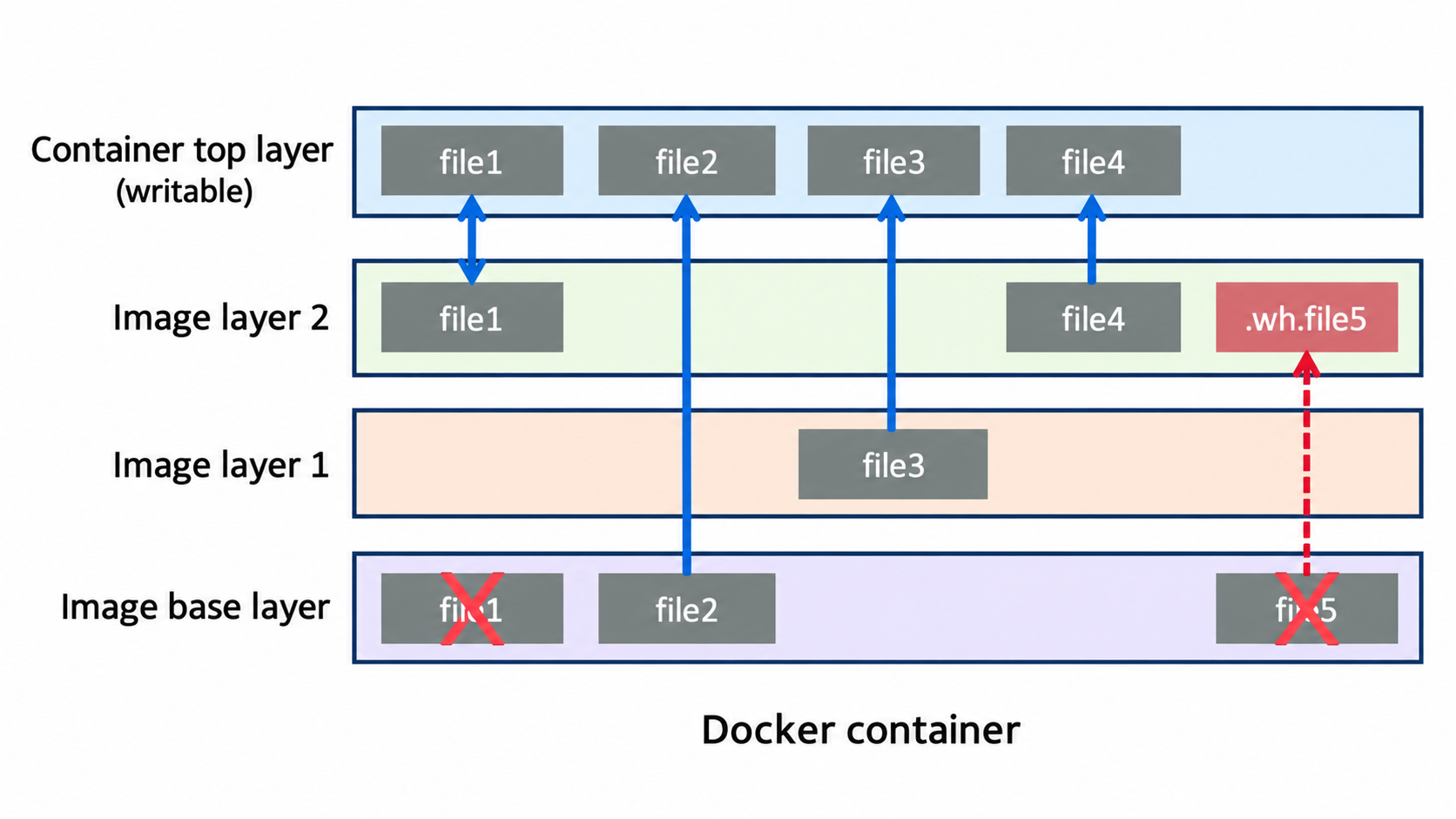
A container image is defined by a manifest that specifies its layers, along with configuration metadata. These layers must be available when we run a container. If two images share the same base image, Docker can reuse the shared layers rather than storing duplicate copies. When an image is pushed to a registry, all its layers must be available in the registry so that the image can be pulled and run on another machine.
Why Kubernetes?
Section titled “Why Kubernetes?”Kubernetes is a container orchestration system. Kubernetes shines when we’re running a fleet of containers across multiple physical or virtual machines.
Let’s say we want to run 100 containers across 20 machines. Without Kubernetes, we would first have to decide which machine to run each container on, log into that machine, and make sure everything is configured correctly so that other services can reach the container.
We also want flexibility. For example, we might want to move a container to another machine if necessary, but you can imagine how much manual overhead and reconfiguration this would involve. This approach simply doesn’t scale to large data centers, which is why Kubernetes was originally developed at Google.
Kubernetes 101
Section titled “Kubernetes 101”Before we begin, I think it’s helpful to first visualize a cluster of machines and how Kubernetes works across them. Concepts like Deployments and ReplicaSets are logical abstractions that span multiple machines under the hood, and I think it’s easier to understand these concepts once we have some low-level intuition.
A Kubernetes cluster consists of nodes, each of which is a VM or a physical machine. Control plane nodes run the components responsible for managing the cluster, while worker nodes actually run containerized workloads.
Control Plane    |    +-- API Server    +-- Controller Manager    +-- Scheduler    +-- etcd    ...
Worker Node A    |    +-- kubelet    +-- Container runtime    +-- Pods
Worker Node B    |    +-- kubelet    +-- Container runtime    +-- Pods
Here are brief explanations of the components that make up the control plane.
- API Server: Exposes an API that
kubectland other components use to read or update the cluster state. - Controller Manager: Runs controllers. As we will discuss later, controllers are responsible for reconciling the desired state with the actual state of the cluster.
- Scheduler: Decides which worker nodes to place Pods on.
- etcd: A key-value store that stores the state of the cluster. Keys are organized hierarchically and can identify resources by their type, namespace, and name (e.g.,
Key: /registry/pods/default/nginx-pod). Note thatetcdis used to store the cluster state but is not meant to be queried directly. Queries go through the API server, which reads frometcd.
On each worker node, we have the kubelet along with the container runtime and the actual Pods. The kubelet is an agent running on each node. For example, if the scheduler decides to place a new Pod on a worker node, the kubelet on that node is responsible for observing the change and actually starting the Pod.
Deployment, ReplicaSet, and Pods
Section titled “Deployment, ReplicaSet, and Pods”A Pod is a smallest deployable unit in Kubernetes. A Pod can run one or more containers. It’s common to have one container per Pod, though tightly coupled containers can run in the same Pod (e.g., a main container and a sidecar container that collects logs from the main container). Each Pod has its own IP address, and containers in the same Pod can communicate over localhost.
Worker Node └─ Pod └─ ContainerA ReplicaSet is one-level higher than Pods. For example, a ReplicaSet can describe that we want three Pods. The ReplicaSet controller will continuously try to maintain the desired state, so if one Pod dies, the ReplicaSet will create a replacement. ReplicaSets are not created or managed directly — they are typically created and managed by a Deployment. Note that Pods in a ReplicaSet can span multiple worker nodes.
A Deployment again sits one level above ReplicaSets. A Deployment manages how a workload changes over time.
For example, we might initially have:
Deployment ↓ReplicaSet A image = app:v1 replicas = 3If the app is updated to app:v2, the Deployment can create a new ReplicaSet.
Deployment ├── ReplicaSet A → app:v1 └── ReplicaSet B → app:v2During a rolling update, we might temporarily have something like:
ReplicaSet A → 2 old PodsReplicaSet B → 1 new PodBefore eventually reaching:
ReplicaSet A → 0 old PodsReplicaSet B → 3 new PodsSo a useful mental model to have is:
Deployment | v ReplicaSet | +------+------+ | | | Pod Pod PodA cluster can host many Deployments. We might have something like:
Kubernetes Cluster
Deployment: frontend  -> 3 Pods
Deployment: backend  -> 5 Pods
Deployment: auth-service  -> 2 Pods
Deployment: metrics-service  -> 2 Pods
Services and Ingress
Section titled “Services and Ingress”Pods are ephemeral; they can be destroyed and recreated, potentially on different worker nodes with different IP addresses. This means that tracking individual Pod IPs can become difficult.
A Service is an abstraction that provides a stable network endpoint (IP and DNS name) for a group of Pods. Traffic sent to the Service is routed to one of the matching Pods.
Services aren’t tied to a ReplicaSet or a Deployment, although it’s common for a Deployment to have a corresponding Service. The target Pods of a Service can be selected based on label-based and selectors. For example, a Service with the selector app=backend can route traffic to Pods with the label app=backend.
There are three types of Service: ClusterIP, NodePort, and LoadBalancer.
-
ClusterIP is the default. ClusterIP Service provides a stable endpoint that is reachable only from within the cluster. For example, if we create a Service for backend Pods, frontend Pods in the same cluster can access that Service, but an arbitrary client outside the cluster cannot.
-
NodePort exposes a Service on the same port of every node in the cluster. An external client can access the Service using a node’s IP address and that port. This provides a simple way to expose a Service outside the cluster, although it’s not commonly used as the primary entry point for external traffic in production environments.
- LoadBalancer is a Service type commonly used in cloud environments, where the Service is exposed through a cloud provider’s external load balancer. Depending on the implementation, the load balancer may forward traffic to worker nodes or directly to Pods. The load balancer is typically integrated with Kubernetes through the cloud provider’s infrastructure, allowing it to adapt to changes in the cluster.
One more thing worth mentioning is Ingress. Ingress sits one level above Services and routes external HTTP/HTTPS traffic to the appropriate Service inside the cluster. A Service is a more general networking abstraction that supports protocols like HTTP, HTTPS, PostgreSQL, Redis, gRPC, and other TCP/UDP traffic. Ingress, on the other hand, is specifically designed for HTTP/HTTPS routing.
Ingress itself is just a configuration recognized by Kubernetes that defines rules like “route requests to /api to backend-service and requests to / to frontend-service.” An Ingress controller is the actual implementation that handles the traffic, often using a reverse proxy like NGINX.
Internet | vIngress | +--> frontend Service | +--> api ServiceHealth Probes
Section titled “Health Probes”Another frequently asked interview topic is health probes. The kubelet is responsible for monitoring the status of the Pods and containers running on its worker node and reporting their status back to the control plane. The kubelet and container runtime can tell whether a container is running, but that doesn’t necessarily mean the application inside it is healthy. An application may still be running while being stuck or unable to serve requests. This is why applications often expose a health endpoint such as /health, which the kubelet can probe periodically to determine whether the application is healthy.
There are two main types of probes: readiness probes and liveness probes. A readiness probe checks whether the application is ready to receive traffic, while a liveness probe checks whether the container should be restarted.
A readiness probe asks, “Should this Pod receive traffic right now?” A Pod can be running but not yet ready to receive traffic. For example, the application may still be initializing, connecting to a database, or waiting for another dependency. In that case, the Pod is marked “NotReady”. If a Service selects that Pod, Kubernetes removes it from the Service’s ready endpoints, so traffic is not sent to it through the Service. The kubelet continues running the readiness probe periodically, and once the probe succeeds, the Pod can be marked “Ready” and receive traffic again.
A liveness probe asks, “Is this container still functioning, or should Kubernetes restart it?” An application process can still be running even when the application is effectively broken, for example, if it is stuck in a deadlock. If the liveness probe repeatedly fails, the kubelet restarts the container.
If a Pod shows CrashLoopBackOff in kubectl get pods, it means that one of its containers has repeatedly failed and Kubernetes is delaying its next restart. This typically happens when the container’s main process keeps exiting unexpectedly or when its liveness probe repeatedly fails. Kubernetes uses exponential backoff between restart attempts to avoid restarting the failing container too frequently.
Volumes
Section titled “Volumes”A Volume refers to storage that a Pod can mount and use. A container’s own writable filesystem is ephemeral, so data stored there can be lost when the container is replaced. If the data needs to survive Pod or container replacement, the Pod should use persistent storage.
A PVC (PersistentVolumeClaim) is a Kubernetes object that represents a storage request, such as “I need 10 GB of persistent storage.” The PVC abstracts away the details of the underlying storage resource, so the Pod doesn’t need to know something like “I’m using a 10 GB EBS volume.”
A PVC is then bound to a PV (PersistentVolume), which represents a storage resource available to the cluster. A PV is a Kubernetes object that represents persistent storage, not necessarily the storage device itself.
Once a PVC is bound to a PV, the binding is generally stable. The PVC continues to reference the same PV rather than being dynamically reassigned to different storage resources.
Pod ↓ usesVolume ↓ can referencePVC ↓ bound toPV ↓ backed byactual storageCRI, CNI, CSI
Section titled “CRI, CNI, CSI”Kubernetes does not implement the entire stack itself. Instead, it relies on several pluggable components for lower-level functionality.
For example, Kubernetes does not implement its own container runtime. Any runtime that supports the CRI (Container Runtime Interface), such as containerd or CRI-O, can be used, and the kubelet communicates with that runtime through CRI.
Similarly, CNI (Container Network Interface) defines a standard interface for configuring container networking. Networking solutions such as Calico, Cilium, and Flannel use CNI to provide networking functionality for Pods, including assigning IP addresses and setting up connectivity between Pods.
CSI (Container Storage Interface) allows Kubernetes to work with different storage systems through a standard interface. CSI drivers handle communication with the underlying storage systems, which can include local storage, network-attached storage, or cloud storage services such as Amazon EBS.
I think this is a good high-level overview of Kubernetes, though for an interview, one might need to be more familiar with hands-on skills like troubleshooting failing Pods or using specific kubectl commands.
I had a lot of fun learning Kubernetes, and I think the technology is really cool. This time, I only did a small hands-on lab using Minikube, but I hope I can revisit Kubernetes soon through more projects.